

Optometry EHR Software in 2026: What to Upgrade First

- Remove the current class from the content27_link item as Webflows native current state will automatically be applied.
- To add interactions which automatically expand and collapse sections in the table of contents select the content27_h-trigger element, add an element trigger and select Mouse click (tap)
- For the 1st click select the custom animation Content 27 table of contents [Expand] and for the 2nd click select the custom animation Content 27 table of contents [Collapse].
- In the Trigger Settings, deselect all checkboxes other than Desktop and above. This disables the interaction on tablet and below to prevent bugs when scrolling.
If your practice is juggling separate tools for scheduling, EHR, billing, patient communication, and optical, you’re paying for it in duplicate data entry, missed details, and avoidable delays. A modern optometry setup should integrate your EHR, practice management, patient portal, eligibility and claims workflows, optical operations, and reporting in one place, allowing your team to spend less time switching systems and more time with patients.
Here’s what to look for in 2026, and what to upgrade first.
All-in-One Optometry EHR and Practice Management
Let's start with the core problem many practices face. You've got one system for scheduling. Another for your EHR. A third for billing. Maybe a separate tool for patient communication. And don't forget the optical software that doesn't talk to anything else.
Every one of those disconnected systems creates friction. Your team enters the same patient information multiple times. Data doesn't sync, so nobody's quite sure which system has the most current insurance details. Staff waste time switching between programs, and mistakes happen when information lives in silos.
Why Disconnected Systems Slow Optometry Practices Down
Count how many different systems your practice uses daily. Every separate login represents inefficiencies like these:
- Multiple logins mean wasted time. Switching between systems adds up to hours per week.
- Duplicate data entry creates errors. The more places information lives, the more likely something's wrong somewhere.
- Integration fees add up. What are you paying to make separate systems talk to each other?
- Training gets complicated. Multiple platforms mean multiple training programs and more time to onboard new staff.
What a Modern Optometry System Should Include
- One patient record across clinical + optical
- Patient portal for forms, payments, prescriptions, and messaging
- Eligibility checks and clear insurance workflows
- Billing/claims tools that reduce rework
- Optical POS + inventory + ordering connected to the patient record
- Device/lab integrations that reduce manual entry
- Reporting/analytics you can run without spreadsheets
- Cloud access + security fundamentals (roles, audit trail, MFA/2FA where applicable)
EHR Upgrade Priorities for 2026 (What to Fix First)
If you're modernizing multiple systems, prioritize upgrades in the order that protects revenue and keeps your schedule running smoothly. Start with workflows that prevent cancellations, reduce rework, and expedite payment, then move on to patient self-service, efficiency improvements, and more in-depth analytics.
Revenue & Patient Flow (Eligibility, Claims, Payments, Scheduling)
Start here because it protects cash flow and prevents schedule chaos. Your first priority should be reducing appointment friction and billing rework: eligibility verification at booking, clean claim workflows, and payment collection without extra steps.
When coverage is validated before the patient arrives and payments are easier to collect and post, your team spends less time on exceptions, and your revenue cycle runs more smoothly.
Automated eligibility checks can run in the background at the moment an appointment is booked, helping teams confirm coverage earlier and reduce day-of surprises.
Look for workflows that support:
- Automatic verification at booking
- Integrated eligibility results (where available)
- Clear status indicators that your team can read quickly
- Support for both vision and medical workflows
- A defined process for non-integrated plans (ex: “Not Started, In Progress, Complete”)
The key isn't just running checks, it’s handling exceptions without stalling the schedule. Build a simple fallback workflow for "no response" or mismatched coverage: flag the appointment, assign an owner, and confirm benefits before the patient arrives. When staff know exactly what to do, you avoid last-minute surprises at check-in.
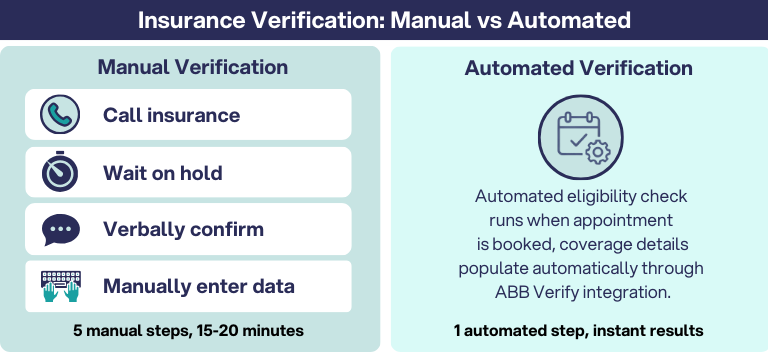
Revenue protection also depends on clean handoffs after the visit. Claims should be easier to submit the first time correctly, and payments should post without extra clicks or manual reconciliation. Reducing rework here prevents small errors from turning into denials, delayed reimbursements, and end-of-month cleanup.
Measure what matters (first 30–60 days):
- Eligibility exceptions per week and time to resolve
- Claim rejections/denials and top reasons
- Time from visit to claim submission (or billing queue time)
- Checkout collection rate (copays, balances, deposits where applicable)
- A/R aging trend (even a simple "Is it improving?" view)
What to prioritize first:
- Verify eligibility at booking, with a clear "no response" workflow
- Reduce rework in claims submission, corrections, and posting
- Make payments simple: copays, refunds, payment plans, receipts, and end-of-day close
- Keep scheduling efficient: reschedules, cancellations, waitlists, recalls (as applicable)

Patient Experience (Portal, Forms, Messaging)
Patient experience upgrades should reduce friction for patients and reduce interruptions for staff. The biggest wins come from self-service: letting patients complete routine tasks online, so your front desk isn’t stuck in nonstop phone tag.
A patient portal should function like an extension of your front desk, giving patients a single place to handle the tasks that usually generate calls and delays.
What a strong portal supports:
- Self-service hub: Scheduling, bill pay, prescription access, and order history in one place
- Mobile-friendly access: Patients can manage care from any device
- Pre-visit efficiency: Digital forms and demographic updates completed before arrival
- Family accounts: Easier management for households (where available)
- Secure messaging: HIPAA-compliant communication for appropriate questions and updates
- Compliance support: patient record access and data sharing features aligned to regulatory requirements (where applicable)
When patients can confirm appointments, complete forms, and pay balances without calling, you reduce the most common quick questions that disrupt the day. Check-in gets faster, staff spend less time re-entering information, and patients feel taken care of before they even arrive.
Quick Start Tip: To avoid a “portal that nobody uses,” start with three high-impact workflows: digital intake forms, text/email reminders with a self-serve reschedule link, and online bill pay.
Once those are running smoothly, expand into messaging and deeper self-service features.
Measure what matters:
- Inbound call volume (especially scheduling and billing calls)
- Form completion rate before the visit
- Average check-in time
- No-show/cancellation rate after reminders go live
RevolutionEHR's Patient Portal is like having your front desk in your patient's pocket:
- All-in-one hub. Scheduling, messaging, bill pay, prescription access, and eyewear orders in one place.
- Mobile-friendly design. Patients manage their care from anywhere, on any device.
- Practice branding. The portal reflects your practice's look and feel.
- Pre-exam efficiency. Digital forms, demographic updates, and family account linking streamline check-in.
- Secure messaging. HIPAA-compliant communication between patients and providers.
- ONC compliance. Meets regulatory requirements with CCDA transmission.
When patients can handle tasks online, you reduce routine calls for scheduling and billing questions. Your staff gets time back to focus on in-person patient care.
Clinical & Optical Efficiency (Templates, Ordering, Inventory)
Once your revenue and patient flow are stable, the next priority is reducing the busywork inside the visit and in optical. The goal is simple: fewer clicks, less re-typing, and one patient record that supports the entire journey, from exam to eyewear.
Smarter Clinical Workflows: Faster documentation, Faster Context
Clinical documentation shouldn’t distract attention from the patient or require a second shift after hours. Modern practice management tools can help teams capture information more efficiently during the encounter and standardize how notes are completed across providers.

Rapid Review: Instant Access to Patient Context
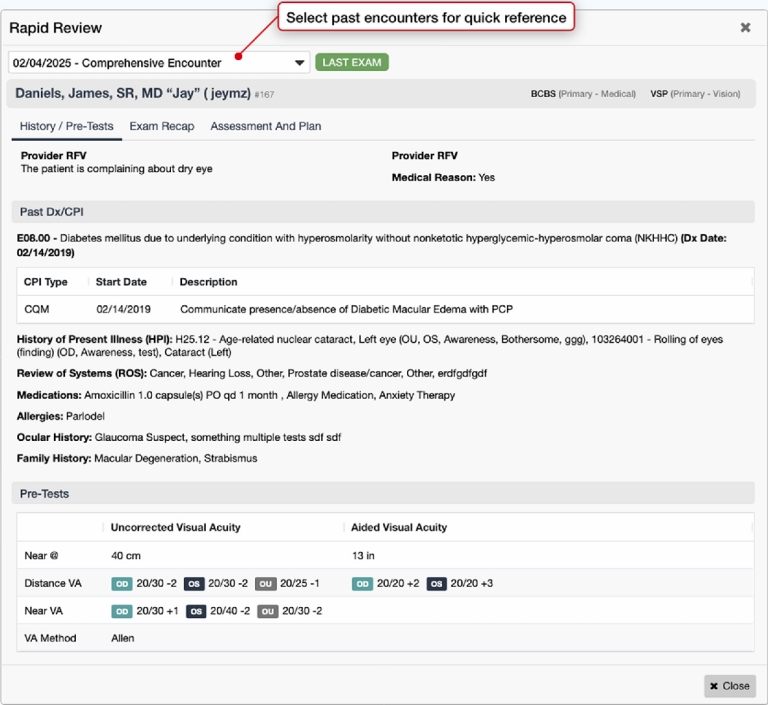
Even with efficient documentation, clinicians still lose time hunting for history across multiple screens. Rapid Review is designed to surface key clinical context quickly so you can stay oriented without tab-hopping:
- One-screen summary accessible from multiple points in the workflow
- Current and historical context without bouncing between visits
- Less click fatigue when you need answers mid-exam
- Stay in flow without leaving the task you’re working on
The result is a smoother exam day: less time searching for details, fewer interruptions, and more consistent documentation.
Rev AI Scribe
AI Scribe is intended to streamline documentation with AI-assisted workflows further. The goal is to reduce after-hours charting by capturing more of the visit in the moment, while keeping the clinician in control through review and approval.
Optical and Inventory Efficiency: Ordering and Tracking Without Switching Systems
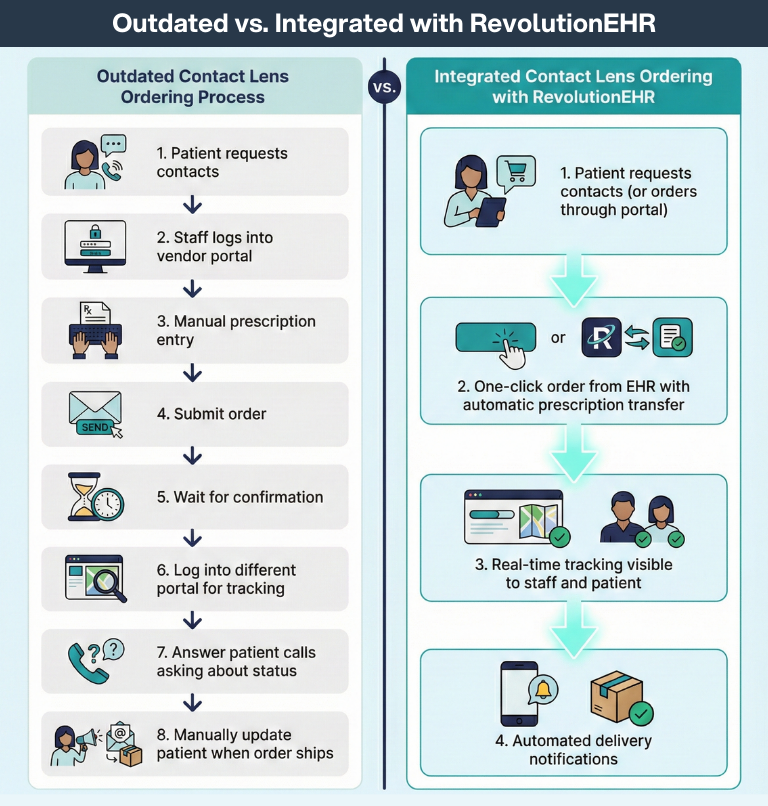
Clinical efficiency shouldn't stop when the exam ends. Optical workflows work best when ordering, inventory, and patient details stay connected, so staff don't have to switch tools or reconcile mismatched information.
Look for optical capabilities that keep everything in one place:
- Optical POS + inventory connected to the patient record
- Electronic lab ordering directly from patient details and prescriptions
- Order status visibility so staff can update patients without chasing vendors
- One complete patient view across clinical and retail workflows
When clinical and optical workflows share the same source of truth, teams spend less time on re-entry and workarounds, and more time delivering a smooth experience from exam to eyewear.
Reporting & Growth Visibility (Analytics)
Once core workflows are running smoothly, reporting is what turns "we think things are improving" into "we know." A modern optometry EHR software should make it easy to answer basic questions about schedule performance, revenue, and inventory without exporting everything to spreadsheets or waiting on someone "who knows how to run reports."
What Reporting Should Help You See Quickly
The best analytics don’t feel like homework. They help you spot issues early and act faster, like:
- Schedule health: No-show and cancellation trends by day, time, provider, and appointment type
- Revenue visibility: Revenue by provider and service type, plus trends over time
- Optical performance: Best sellers, inventory turns, product mix, and items that sit too long
- Billing signals: A/R aging, reimbursement timing, and where claims get stuck or rejected
- Team workload: Volume by role/provider and bottlenecks that slow the day
How to Use Optometry Analytics to Prove ROI
If you're upgrading in 2026, set a baseline before go-live, then track a few metrics for 30–90 days. When reporting is easy to access and consistent, you can validate whether automation and self-service are actually reducing calls, tightening check-in, and speeding up reimbursement.
Simple “start here” metrics (30–60 days):
- No-show rate and cancellation rate
- Inbound call volume (especially scheduling and billing calls)
- Average check-in time (or front-desk time per patient)
- Claim rejections/denials and top reasons
- A/R aging trend and time-to-payment directionally
Reporting is what helps you prioritize the next improvements, whether that's tightening scheduling rules, adjusting recall campaigns, fixing claim workflows, or optimizing inventory.
What to Ask in an EHR/Practice Management Demo
Implementation and Training Support: What “Good” Looks Like
Switching systems is a big decision, so partner with a vendor that makes transition smooth:
- Dedicated migration assistance. Your data needs to transfer correctly and completely.
- Comprehensive training programs. Look for on-site training, webinars, and ongoing support resources.
- Phased approach. You don't need to learn everything on day one.
RevolutionEHR provides extensive support throughout implementation, including dedicated transition teams and continuous training resources.
Why RevolutionEHR for Your 2026 EHR & Practice Management Upgrade
RevolutionEHR combines comprehensive practice management with cutting-edge AI features in one platform that offers:
- A true all-in-one system. EHR, practice management, optical, and patient engagement integrated completely.
- AI-powered innovation. Features like AI Scribe, Automated Insurance Eligibility, and Rapid Review eliminate repetitive work.
- Built for optometry. Designed by ODs with optometry-specific workflows, not adapted from medical systems.
- Cloud-based flexibility. Secure access from any device with automatic updates and backups.
- Industry-leading integrations. Works seamlessly with top labs, clearinghouses, diagnostic tools, and VisionWeb.
- Proven quality. Over 13,000 practices trust RevolutionEHR for their daily operations.
Here are upcoming RevolutionEHR releases for ODs and vision care staff to look forward to:
AI Scribe: You Talk, We'll Take Notes
AI Scribe changes documentation completely with voice-driven data entry, bringing you:
- Natural speech recognition. Talk naturally through the exam for the 10 most commonly used tests in optometry.
- Real-time population. Data fields fill automatically as you speak.
- One-click launch. Start from the unified exam screen without disrupting your workflow.
- Full control. Review and approve everything before it becomes part of the record.
You get more face-to-face time with patients and zero post-exam documentation burden. You’ll get out the door on time each night, and even better, you can stop bringing your charting home.
The ROI of an Integrated, AI-Powered Platform
Technology investments should deliver measurable returns. Here's what practices see when they move to a unified platform with intelligent automation.
- Time savings equal revenue growth. When staff aren't switching systems or doing duplicate data entry, they focus on patient care and revenue-generating activities.
- Faster cash flow. RevClear supports a 98% claim acceptance rate, which means fewer denials, fewer resubmissions, and faster payment.
- Reduced overhead costs. One platform means one subscription, one training program, and one support relationship instead of managing multiple vendors.
- Patient loyalty increases. Modern convenience drives satisfaction, referrals, and retention.
- Scalability improves. Cloud-based integrated systems make adding locations dramatically easier than managing separate installations.
The practices that thrive in 2026 will be the ones with the smartest systems, platforms that work together seamlessly and automate the repetitive work that used to eat up staff time.
Get Your Free Demo
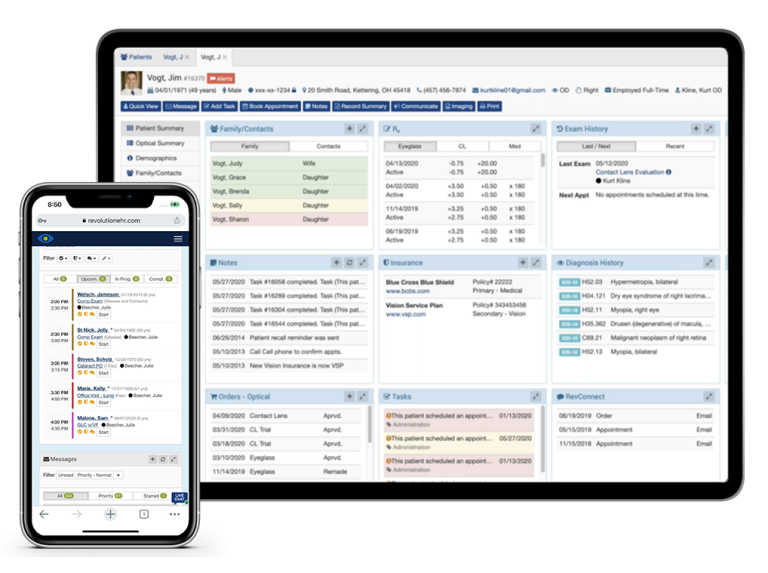
Ready to see how RevolutionEHR's all-in-one platform with AI-powered features can transform your practice in 2026? Schedule a demo to explore our unified EHR and practice management system, including AI Scribe, Automated Insurance Eligibility, Rapid Review, Patient Portal, and comprehensive optical management.


FAQs
What does “tech stack” mean for an optometry practice?
How do I know if my practice is overusing disconnected tools?
What should we upgrade first in 2026?
What features matter most in an all-in-one optometry platform?
Will a patient portal actually reduce phone calls?

Backed by deep expertise in optometry and a commitment to the success of eye care practices, RevolutionEHR offers insights and perspectives designed to help providers streamline operations, enhance patient care, and thrive in a changing healthcare landscape.