

The Future of Optometry Practice Payments

- Remove the current class from the content27_link item as Webflows native current state will automatically be applied.
- To add interactions which automatically expand and collapse sections in the table of contents select the content27_h-trigger element, add an element trigger and select Mouse click (tap)
- For the 1st click select the custom animation Content 27 table of contents [Expand] and for the 2nd click select the custom animation Content 27 table of contents [Collapse].
- In the Trigger Settings, deselect all checkboxes other than Desktop and above. This disables the interaction on tablet and below to prevent bugs when scrolling.
Is your payment system helping you or holding you back?
Count how many steps it takes for a patient to pay their bill. If the answer involves “call the office,” “wait for a statement,” or “we'll enter that manually,” you're leaving money on the table.
The practices making strategic payment decisions now are building advantages that will compound over the next five years. Here's what's changing in optometry payments and which upgrades protect revenue first.
- Patients expect tap-to-pay and mobile pay, plus online/text-to-pay for balances.
- Practices need payment workflows embedded in optometry EHR/PMS, not bolted-on tools.
- The next advantage is automation across the full revenue journey.
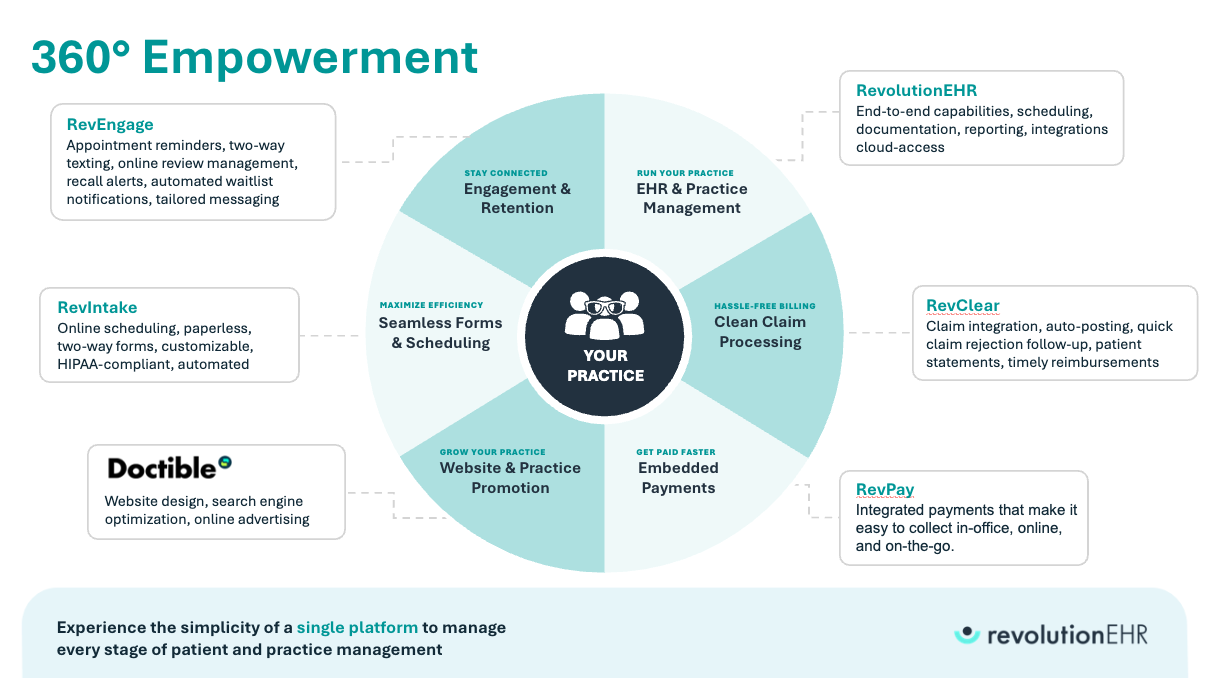
The future of optometry payment processing is embedded (meaning payments live inside your EHR, and aren't just bolted on). That's why we built RevPay as a native part of RevolutionEHR.
If you want to see the workflow end-to-end, request a personalized demo.
Why Optometry Payment Processing Is Changing and What It's Costing Practices Today
Your staff manually enters the same credit card information three times for a single patient visit. Cards on file expire, payment plans fail, and someone has to call patients for updated information. Your front desk fields the same “did my payment go through?” calls every afternoon. End-of-day reconciliation takes 45 minutes when it should take five.
Every one of those friction points costs you time and money.
The Hidden Cost of Patchwork Optometry Payments: Delays, Errors, and Revenue Leakage
What you're actually paying for disconnected payment tools:
- Staff time and revenue delays. Your team switches between your practice management system, a separate payment terminal, maybe a third-party processor portal, and spreadsheets for reconciliation. Every system switch adds clicks and increases the chance of posting errors.
- 71% of providers report it takes over 30 days to collect payments after patient encounters. When your payment system isn't connected to your EHR, staff manually chase balances instead of collecting at the time of service.
- Patient frustration. 62% of consumers prefer to pay their medical bills online. When you can't offer that, patients pay slowly or choose practices that make it easier.
- Hidden transaction fees. Most practices pay 2.25-4% in processing fees, which costs a $2 million practice roughly $12,000 annually. Standalone processors often hide fees in complex monthly statements, so you don't know what you're actually paying until the bill arrives.
For practices evaluating their next tech stack, this is often the moment they start asking whether it’s time to switch to a system designed to eliminate workarounds.

The Future of Optometry Payment Processing: From Transactions to Workflows
Patient expectations shifted dramatically over the past five years. What used to be “nice to have” is now baseline. 85% of consumers prefer to pay their medical bills using electronic payment methods.
Your patients can order groceries online, pay restaurant bills by tapping their phone, and manage their banking from their couch. When they can't do the same thing with their optometry bill, you create friction that delays collections and damages satisfaction.

2026 and Beyond: What Optometry Patients Will Expect at Checkout and Online
Modern patients expect all of the following when they walk into your practice or visit your website
- Contactless tap-to-pay at checkout. 78% of patients want contactless payment options. The ability to pay with Apple Pay®, Google Pay™, or NFC-enabled cards is no longer an “extra.”
- Online payment portals for 24/7 access. Patients want to pay on their schedule, not yours. When they receive a text reminder about an outstanding balance, they should be able to click a link and pay immediately from their phone.
- Card-on-file for repeat visits. Save a patient's card once so follow-up visits get paid in one click. No more awkward “can I grab your card?” moments. No more manual entry for every visit.
- Flexible payment plans for premium services. Buy now, pay later (BNPL) services are on the rise; 91.5 million Americans already use them. When patients can spread the cost of premium progressive lenses or specialty contact lenses over time, they're more likely to say yes to higher-quality care.
The practices offering these options first are gaining market share. They're providing a better overall experience that matches how patients manage every other part of their lives.


5 Capabilities That Will Define Modern Optometry Payment Processing
New payment technologies emerge constantly. You don't need all of them, but you do need the ones that solve your specific problems: slow collections, staff time waste, and patient friction.
1. Contactless and Mobile Wallets as Baseline
Contactless payments reduce checkout time, improve patient satisfaction, and show your practice keeps pace with modern expectations. Modern integrated payment solutions support contactless payments.
2. Card-on-File with Automatic Updater Technology
Expired credit cards quietly drain revenue from practices running payment plans or storing cards on file. When stored payment methods expire, automatic payment plans fail and staff waste time calling patients for updated information.
Automatic card updater technology solves this before you know there's a problem. The system connects directly with card networks to receive updated information when cards expire or get reissued. Payments continue without interruption. Staff time gets redirected to higher-value activities.
This is particularly valuable if you offer payment plans for premium services or subscription-based contact lens programs. When recurring payments flow smoothly, you avoid the revenue leakage that comes from failed transactions.
3. Payment Plans for Optical and Premium Services
Your patients increasingly expect the option to split larger purchases into manageable payments. When premium progressive lenses, specialty contact lenses, or comprehensive vision packages cost several hundred dollars, flexible payment options reduce the barrier to saying yes.
Set up payment plans directly in your workflow, store cards securely, and let the system handle recurring charges automatically. Your team spends less time chasing payments and more time delivering care.
Payment flexibility matters most when patients are making higher-ticket optical decisions, especially in practices running a modern optical shop workflow.
4. One Payment Experience Across In-Office, Online, and Phone
The problem with most payment setups is that patients can pay in the office with a terminal, but online payments go through a different system that requires separate reconciliation. Phone payments need manual entry. Nothing syncs automatically.
Your patients don't think in terms of “in-office payments” versus “online payments” versus “phone payments.” They want to pay however is most convenient at that moment. They expect their payment to update their account immediately, regardless of which channel they use.
Integrated payment platforms deliver this. A patient can start a payment in your office, complete it online later, or call to pay over the phone, all within the same system that automatically updates their records. Eliminate duplicate entry, reconciliation headaches, and posting errors.
When payments and patient data flow through one connected system, your staff works faster and your books stay accurate.
5. Real-Time Posting, Reconciliation, and Reporting
The future of optometry payment processing isn’t just more ways to take a card. It’s knowing instantly and accurately what was collected, what’s still owed, and where the money should land in the patient record and your books.
In most practices, the real cost of payments shows up after checkout: staff re-key transactions, chase down mismatches, and spend end-of-day closeout bouncing between terminals, portals, spreadsheets, and the EHR. That’s not a “back-office nuisance.” It’s a visibility problem that creates posting errors, delayed deposits, and time-consuming clean-up that scales with your volume.
Real-time posting and reconciliation changes the operating model:
- Payments post automatically to the correct patient ledger at the moment the transaction happens, reducing manual entry and preventing balance confusion.
- Reconciliation becomes a quick verification step instead of a daily project, because the system ties transactions to encounters, invoices, and adjustments in the same workflow.
- Reporting becomes operational, not historical: your team can answer “did my payment go through?” immediately, see what’s outstanding without exporting data, and spot bottlenecks before balances age.
This capability matters most in optometry because payments aren’t limited to one moment. You’re collecting across the full journey: deposits at scheduling, copays at check-in, optical purchases after the exam, and balance payments days later. When every channel updates the same record in real time, patients get clarity, staff get time back, and revenue cycle decisions can be made with confidence—not guesswork.
What to look for in a demo: Ask to see a payment taken in-office, an online/text payment made later, and a refund or adjustment. Then, watch whether each action posts instantly to the ledger and rolls cleanly into end-of-day closeout and reporting without manual work.
Real-time visibility is what turns payment data into operational decisions, especially when it connects to reporting workflows like quality reporting.
Integrated vs Embedded: The Big Shift in the Future of Optometry Payments
You can have the flashiest payment features in the world. If they don't connect with your practice management system, they'll create more work instead of less. But there's a bigger distinction most practices miss: the difference between an integrated processor and an embedded payments solution.
Why Embedded Payments Will Replace “Bolted-On” Processors
Most payment processors focus on moving money efficiently. They process transactions, provide terminals, and offer monthly statements. Some go a step further and integrate with your practice management system.
That's better than standalone, but it's still not the same as embedded payments.
Integrated processors optimize the checkout experience, typically in-office. They connect at the point of transaction and sync data back to your EHR. That's one moment in the patient journey.
An embedded payments solution is different. It's built into your practice management platform from the ground up, which means payments can be optimized at every step of the care journey, not just at checkout.
- Before the visit: Card-on-file collection and balance notifications.
- During the visit: Seamless time-of-service collection with automatic ledger posting.
- After the visit: Online bill pay, automated reminders, payment plan management, and failed payment recovery, all without staff intervention.
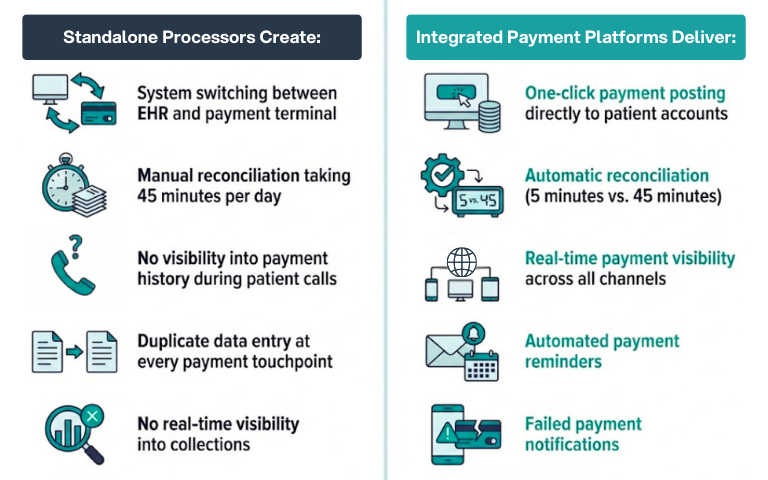
Standalone processors and basic integrated processors create predictable problems:
- System switching and manual reconciliation. Your team switches between your EHR, the payment terminal, and a processor portal for reporting. Every system switch adds clicks and slows you down. Payments need to be manually posted to patient accounts. End-of-day closeout requires checking multiple systems.
- Mistakes happen when information lives in silos. Most processors can't trigger automated payment reminders or failed payment notifications because they don't connect to your patient records at a workflow level.
- No real-time visibility. You can't see what's been paid and what's still owed without running reports from multiple places and cross-referencing them.
What Embedded Optometry Payment Processing Enables Across the Patient Journey
Embedded payments platforms don't connect to your practice management system. They live inside it. That means patient records, scheduling, billing, and payments all share the same data in real time.
The impact goes beyond faster checkout. Staff can collect a deposit at scheduling, store the card securely, and let the system handle the rest automatically. Patients can receive a text reminder after their visit and pay from their phone in 30 seconds. Failed payments trigger automatic recovery workflows before balances age.
The architectural difference becomes even more significant as platforms add AI-powered capabilities. Embedded systems can predict payment behavior, automatically optimize collection strategies, and surface insights about revenue patterns.
Standalone processors and bolted-on integrations can't do any of that because they only see transaction data at the moment of payment.
Security in Optometry Payment Processing: PCI, Vaulting, and Risk Reduction
Payment security isn't optional, and it's not something practices should manage themselves. Healthcare data breaches now cost an average of $9.77 million, making healthcare the costliest industry for security failures.
Most healthcare providers now identify cybersecurity as a high priority. The regulatory environment around payment data security keeps tightening. Your payment processor should handle PCI compliance, data encryption, and secure storage as core built-in features.
Storing card information in your practice management system, file cabinets, or unsecured locations is asking for trouble. Use processors with vault technology specifically designed for secure storage that handles all compliance requirements automatically.

How to Future-Proof Optometry Payment Processing: What to Upgrade First
If you're modernizing your payment infrastructure in 2026, start with upgrades that prevent revenue leakage and reduce staff time waste. Once those are stable, expand into patient self-service and advanced analytics.
Priority 1: Collect at Time of Service & Enable Self-service Payments
Start with workflows that directly impact collections:
- Time-of-service collection and online access. The money not collected at the time of service is much harder to collect later. Make checkout fast with card-on-file, contactless options, and receipts that patients can access digitally.
- Patients should be able to pay outstanding balances from their phone 24/7. Send payment reminders via text or email with a direct link to pay.
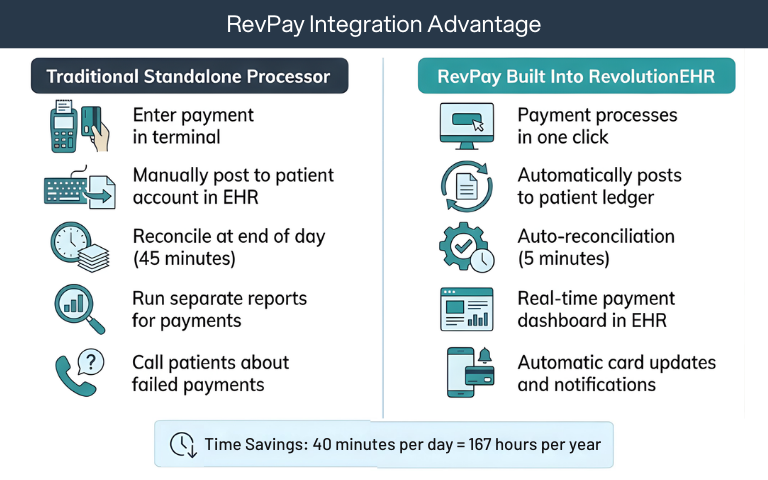
- Automated reconciliation. When payments post automatically to patient accounts, your team spends minutes on closeout instead of hours.
Priority 2: Automate Posting, Reconciliation, and Failed Payment Recovery
Your front desk shouldn't spend half the day answering payment questions, manually entering card information, or reconciling discrepancies between systems.
Here’s how automation reduces these time-wasters.
- Automated payment reminders reduce phone calls and speed collections.
- Automatic failed payment notifications let staff follow up before balances age.
- Real-time payment visibility means staff can answer “did my payment go through?” questions in seconds.
- Integrated reporting shows what's been collected, what's outstanding, and where bottlenecks exist without exporting to spreadsheets.
Priority 3: Add Payment Plans & Optical-friendly Flexibility
Once basic payment workflows are running smoothly, add features that reduce routine interruptions:
- Patient portal with bill pay lets patients check balances and pay without calling.
- Payment plan enrollment gives patients options for larger purchases without requiring staff to set up manual installments.
- Digital receipts and payment history reduce “I need a copy of that receipt” requests.
When patients can handle routine payment tasks themselves, your staff gets time back to focus on in-person care.

Optometry Payments Demo Scorecard: Questions That Reveal Real Integration
Don't accept generic product tours. Ask for real workflow demonstrations using scenarios your practice faces daily.
Questions That Reveal Integration Quality
- Show me end-to-end, checkout to payment posting to reconciliation. How many clicks? How many screens? Does the payment post automatically or require manual entry?
- What happens when a card on file expires? Does the system notify staff? Update automatically? Require manual outreach?
- How do patients pay online? Show me the patient experience from receiving a payment reminder to completing payment on their phone.
- Where do I see what's been collected and what's still owed? Can I run this report without exporting to spreadsheets?
- How does end-of-day closeout work? What does staff need to do manually versus what happens automatically?
- What about refunds, payment plans, and failed transactions? Show me how your team handles these exceptions.
Questions About Pricing and Hidden Fees
- What are the actual transaction fees? Not just the advertised rate. What about monthly fees, terminal fees, PCI compliance fees, and statement fees?
- Are there long-term contracts or early termination penalties? You shouldn't be locked into a processor that doesn't meet your needs.
- How does pricing change as our volume grows? Make sure the pricing structure aligns with your growth plans.
Measuring Results: Metrics That Prove Your Payments Upgrade Worked
- Collection rate at time of service. Are you collecting more copays, balances, and deposits during the visit?
- Days to collect outstanding balances. Has the time from visit to payment decreased?
- Staff time on payment tasks. Are your front desk and billing team spending less time on manual entry, phone calls, and reconciliation?
The Adoption Curve for Optometry Payments (and How to Time It)
The optimal time to modernize your payment infrastructure is before competitive pressure or patient dissatisfaction forces your hand.
Payment platform transitions require staff training, patient communication, and workflow adjustments. The disruption is real and manageable with proper planning. Start with foundational capabilities like online payments, card-on-file, and automatic updates. Build toward more sophisticated features as your team adapts.
Every month you delay, you're losing revenue to friction that modern platforms eliminate. You're also falling further behind practices that are already benefiting from integrated payment infrastructure.
The solution is choosing a payment platform like RevPay that’s built specifically for optometrists.
Pro Tip: Calculate Your Current Payment Processing Costs
Most practices pay 1.5-3% in processing fees. For a $2 million practice, that's:
- At 2.25%: $45,000 annually
- At 3%: $60,000 annually
Add hidden costs:
- Manual reconciliation (45 min/day × 250 days × $25/hour) = $4,688
- Failed payment recovery calls (2 hours/week × 50 weeks × $25/hour) = $2,500
- Delayed collections beyond 30 days = Revenue loss
Total potential savings with integrated platform: $50,000+ per year
RevPay and the Future of Optometry Payment Processing: Embedded by Design
RevPay is an embedded payments solution built directly into RevolutionEHR as a native component of the platform, not a third-party processor connected through an API. This distinction matters more than most practices realize.
Integrated processors focus on the checkout experience. RevPay optimizes payments at every step of the care journey, from the moment a patient schedules an appointment to the final balance collected weeks later.
This isn't a bolt-on payment processor that requires separate logins, manual reconciliation, or workarounds to connect with your practice management system. RevPay functions as a native, embedded component of your EHR, creating seamless workflows from scheduling through payment posting.
How RevPay Aligns with the 5 Capabilities of Modern Optometry Payments
- Payments built into every step of care, not just checkout. Collect deposits at scheduling. Store cards securely at registration. Process time-of-service payments in one click. Send automated reminders with direct pay links after the visit. Manage payment plans without creating manual work. Every touchpoint is connected because RevPay lives inside the same platform your team already uses.
- One system with automatic ledger mapping. Payments, scheduling, clinical documentation, billing, and optical all work together. Your team doesn't switch systems. Payment data flows automatically to where it needs to be, and payments post to the right patient automatically without duplicate entry or reconciliation headaches.
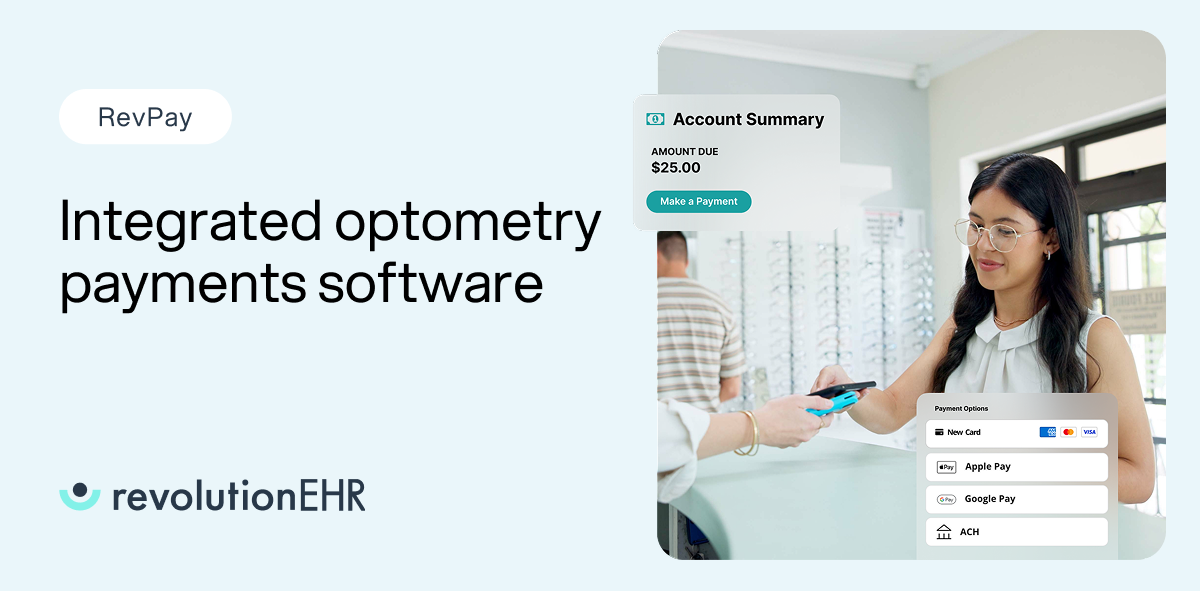
- Real payment flexibility. Accept swipe, chip, tap-to-pay, Apple Pay, Google Pay, ACH, and online payments. Offer payment plans without creating manual work for your staff.
- Predictable funding with transparent pricing. Know when your money hits your bank account, and see exactly what you're paying in transaction fees upfront with no surprise charges buried in your monthly bill.
- Card-on-file and automatic updates. Save cards securely and let the system update expired cards automatically so payment plans never fail.
- Built-in compliance and security. RevPay includes PCI-compliant storage, encryption, and secure processing. You don't manage compliance risk yourself.
What’s Next: Payment Intelligence & Automation Across the Optometry Revenue Journey
RevPay is the first step in a longer journey where embedded payments become more intelligent and connect throughout RevolutionEHR. Because RevPay is embedded rather than integrated, future capabilities like payment intelligence, predictive analytics, and automated collection workflows can extend across the entire care journey.
Standalone processors and bolted-on integrations can't deliver that because they only touch one moment in the patient relationship.
When your payment system connects to scheduling, engagement tools, and reporting dashboards, you can optimize the entire revenue cycle. That's the advantage of embedded payments over integrated processors.
See the Future Workflow in a Demo
The practices positioning themselves for long-term success are the ones making strategic infrastructure decisions now. They're choosing platforms that eliminate friction, protect revenue, and scale with their growth.
Stop losing revenue to payment friction and administrative inefficiency. See how integrated payment infrastructure can transform your practice operations.
Request a personalized demo today.


FAQs
What is the future of optometry payment processing?
What payment methods will optometry patients expect?
Embedded vs integrated payments: what’s the difference?
How do optometry practices reduce time spent on reconciliation?
What should I look for in an optometry payments demo?

Backed by deep expertise in optometry and a commitment to the success of eye care practices, RevolutionEHR offers insights and perspectives designed to help providers streamline operations, enhance patient care, and thrive in a changing healthcare landscape.