logo
Solutions
EHR + Practice Management

Your Complete Optometry Platform

Integrated Solutions
RevAspire

Simplified CMS reporting

RevBilling

Hassle-free claims management

RevClear

Fast, accurate claim processing

RevDirect

HIPAA-compliant provider communication

RevEngage

Supercharged patient engagement

RevIntake

Streamlined intake and scheduling

RevPayments

Integrated payment processing

Practices
Single LocationMulti LocationNew PracticesCorporate-AffiliatedSpecialties Colleges & SchoolsOptical Shops
Pricing
Resources
BlogeBooksWebinarsCase StudiesAll Resources
Company
About UsSupportSwitching EHRs?TestimonialsPartnersContact Us
LoginRequest a demo
Blog
Practice Management

Optometry EHR Features Staff Love: The Short List That Saves Time

By
RevolutionEHR Team
Feb 12, 2026
•
5 min read
Share this post
healthcare staff uses tablet
Instructions
If you intend to use this component with Finsweet's Table of Contents attributes follow these steps:
  1. Remove the current class from the content27_link item as Webflows native current state will automatically be applied.
  2. To add interactions which automatically expand and collapse sections in the table of contents select the content27_h-trigger element, add an element trigger and select Mouse click (tap)
  3. For the 1st click select the custom animation Content 27 table of contents [Expand] and for the 2nd click select the custom animation Content 27 table of contents [Collapse].
  4. In the Trigger Settings, deselect all checkboxes other than Desktop and above. This disables the interaction on tablet and below to prevent bugs when scrolling.
Table of Contents
Heading 2
Heading 3
Heading 4
Heading 5
Heading 6
Related Articles
Optometry EHR Features Staff Love: The Short List That Saves Time
How to Prepare Your Team for a New Optometry EHR (90-Day Plan)
5 Signs It’s Time to Upgrade Your Optometry EHR
Stop EHR Click Fatigue: Rapid Review With Instant Access to Complete Patient Histories
Reality Check: What's Actually Happening in Optometry Practices Today
Related eBooks
2026 Optometry Growth Outlook: What High Performing Practices are Doing Differently
Local SEO for optometrists
Marketing Playbook for Optometry Practices
Optometry Practice Operations Checklist: Evaluate Your Existing Tech Stack
Summer Marketing Essentials for Optometrists
Related Webinars
Turning Your Optometry Practice Into a Billing Powerhouse
State of Optometry: Challenges, Changes, What Comes Next
From Clicks to Patients: The Optometrist’s Guide to Winning with SEO
Beyond the Purchase: Streamline Your Operations as a New Owner
Turnover-Proof Your Practice: 7 Ways to Keep Your Best Employees

Your team shouldn’t have to fight your software to get through the day. The best optometry EHR and practice management systems reduce interruptions at the front desk, speed up check-in, simplify payments, and give staff answers without digging through tabs.

In this guide, we’ll cover the optometry EHR features staff value most because they remove busywork, reduce phone volume, and keep workflows moving from scheduling to checkout to optical.

EHR features that reduce staff workload

A quick view of what matters most to front desk and optical teams

Feature Staff impact Insight
Online Scheduling Reduces phone volume 67% of patients prefer booking appointments online. (Source)
Digital Intake Eliminates manual data entry Saves up to 10 minutes of administrative time per patient. (Source)
Order Tracking Fewer “where’s my order” calls Keeps patients informed and reduces the need for follow-up calls.
Patient Portal Fewer routine phone calls Patient-initiated phone calls decreased by 18% in one practice.

Quick wins for optometry practices:

  • Cut phone volume
  • Reduce data entry
  • Speed up checkout
  • Keep orders visible
  • Make reporting usable

Patient Portal Features That Reduce Calls and Check-In Work

A strong patient portal doesn’t just “look modern.” It reduces the number of calls your staff has to take and gives patients self-serve options for the most common requests: appointments, forms, order status, and quick questions.

Optometry staff will love the efficiency of 

  • Online scheduling + automated reminders: reduce scheduling calls, reduce no-shows
  • Digital forms before the visit: less clipboard time and re-entry
  • Secure messaging: fewer interruptions and better documentation of answers
  • Order tracking + reorders: fewer “where’s my order?” calls
HIPAA-compliant platforms protect patient privacy automatically.

Get instant access to patient information like:

  • Family account management: Parents can handle appointments and information for multiple children from a single login. One parent can schedule exams for several kids, update addresses for the whole family, and review everyone's prescription history without making separate calls for each child.
  • Order tracking: Patients can check the status of their eyewear and contact lens orders themselves. They can review prescriptions and place contact lens reorders online, so your staff no longer has to answer “has my order arrived?” calls multiple times per day.

When portal tools are built into your optometry EHR, your team spends less time repeating the same information and more time helping patients who actually need assistance.

Faster Checkout: Integrated Payments Patients Actually Use

Nobody enjoys chasing payments. Awkward conversations about outstanding balances, and declined cards create stress for everyone. Modern payment features make collections easier and less uncomfortable.

  • Contactless + digital wallets: faster checkout, fewer friction moments
  • Online pay for balances: reduce phone tag and statement follow-up
  • Fewer declined payments: less rework and awkward collection calls
  • One workflow for posting/reconciliation: fewer balancing issues

Automated Insurance Verification

AI-powered insurance eligibility tools check coverage the moment appointments are booked. No extra clicks, no extra effort from your staff.

Real-time verification pulls vision and medical insurance data automatically for integrated plans. Your team knows who's covered before patients walk in, eliminating pre-appointment verification calls and last-minute surprises at checkout.

  • Verify eligibility at scheduling: avoid day-of surprises
  • At-a-glance status indicators: less digging across screens

Visual status indicators show eligibility at a glance. Shield icons and benefit badges display coverage information right in the appointment pane, so your staff doesn't dig through multiple screens to find what they need.

Reporting Staff Can Use Without a Spreadsheet

Staff shouldn't need a degree in data science to answer basic questions about practice performance.

Automated reporting improves reporting with:

  • Pre-built reports for common questions: recalls, cancellations, trends
  • Filters that match real workflows: provider, location, payer, appointment type
  • Easy export/share: simple handoff to owners/accountants
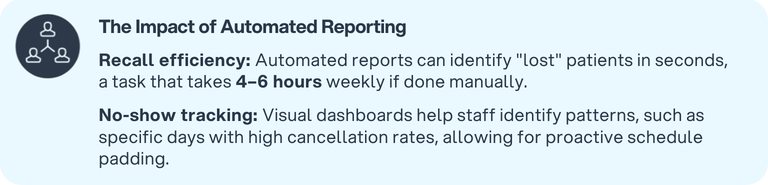
Automated Reporting Boosts Recall Efficiency and No-Show Tracking

Provider Time Back: Features

The last patient leaves at 5:30 pm, but the workday isn't over. Two hours of chart documentation still wait. Late evenings and weekend catch-up sessions have become the norm for many optometrists. 

AI-powered tools are changing that pattern by capturing documentation during appointments instead of after. Here’s why.

  • AI-assisted documentation (review-first): capture during visit, approve after
  • Quick patient summary views: fewer clicks to understand history
  • One platform integration: fewer logins, fewer workarounds

When documentation and patient history are easy to access, providers spend less time clicking and more time focusing on care. Features like review-first AI-assisted documentation, quick patient summary views, and one-platform integration reduce after-hours charting, cut down on screen fatigue, and keep the day moving without extra logins or workarounds.

Automated Tools Send 500 Personalized Messages vs 50 Manual Calls

When your systems work together, staff spend less time on busywork and providers get more time back for patient care.

That smoother experience improves satisfaction, strengthens referrals, and helps reduce burnout and turnover. RevolutionEHR brings these workflows into one integrated, optometry-built platform, so when the software finally works the way it should, everything else falls into place.
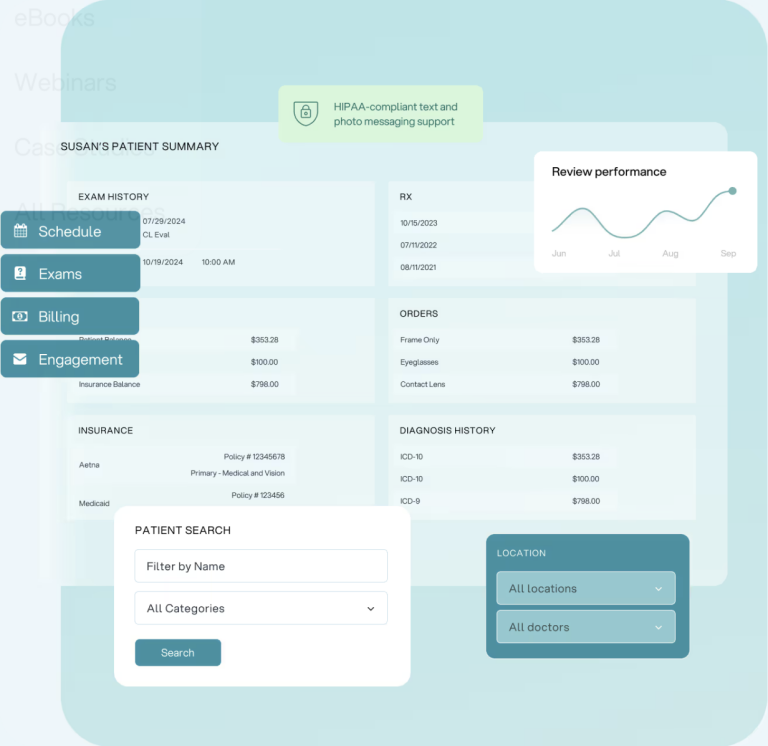
Susan’s Patient Summary Dashboard in RevolutionEHR

How to Compare Optometry EHRs (10-Second Checklist)

How to Compare Optometry EHRs (10-Second Checklist)

Don’t start with the feature list. Start with the workflows your team lives in every day.

Front desk Reduce calls and check-in work

  • ✓

    Online scheduling + automated reminders

    Cuts phone volume and helps reduce no-shows

  • ✓

    Digital intake forms that flow into the chart

    Less re-entry and fewer transcription errors

  • ✓

    Secure messaging and self-serve portal tools

    Fewer routine calls, better patient experience

  • ✓

    Order status visibility (eyewear/contacts)

    Fewer “where’s my order?” interruptions

Billing + payments Faster checkout, cleaner follow-up

  • ✓

    Integrated payments (contactless + digital wallets)

    Faster checkout without jumping between systems

  • ✓

    Online pay options for balances

    Less phone tag and fewer statement cycles

  • ✓

    Eligibility verification before the visit

    Fewer checkout surprises and rework later

  • ✓

    Simple reconciliation and clear reporting

    Close out faster and keep balances accurate

Providers Less clicking, less “pajama time”

  • ✓

    Quick patient summary views

    Fewer clicks to understand history and context

  • ✓

    AI-assisted documentation (review-first)

    Capture during the visit, approve after

  • ✓

    One platform for practice + optical workflows

    Fewer logins and fewer workarounds

Reality check Confirm it works in your day-to-day

  • ✓

    Ask for a workflow demo using your real scenarios

    Scheduling → intake → exam → optical → checkout

  • ✓

    Confirm training and support expectations up front

    So adoption doesn’t fall on one super-user

  • ✓

    Check integrations you rely on

    Labs, suppliers, payments, clearinghouse, etc.

Tip: If the demo doesn’t reduce clicks and handoffs in the workflows above, keep looking.

watch the webinar "Beyond the exam room: turning your optometry practice into a billing powerhouse"
Watch now: How to Turn Your Optometry Practice into a Billing Powerhouse
5-star review
“I have used four previous Optometric programs and EHRs. Revolution is the most impressive EHR to date. I also appreciate the ability of Revolution to continually make changes to improve their system.”

Name Surname

Position, Company name

star rating
“I have used four previous Optometric programs and EHRs. Revolution is the most impressive EHR to date. I also appreciate the ability of Revolution to continually make changes to improve their system.”

Name Surname

Position, Company name

5-star review
"RevolutionEHR is an unbelievably customizable product with exceptional “front of office” capabilities combined with an excellent EMR. All of this supported by a very friendly and helpful customer support staff with a genuine personal approach."

Robert MacAlpine

OD

5-star review
"With multiple locations, I can see what is happening from anywhere. I have doctors who were less than stellar on record keeping and this helps them be efficient and thorough."

Torrey Carlson

OD

5-star review
"The ability for us to access it anywhere and not have to run into the office on weekends to access a patient’s chart when they call is awesome."

Lauren Marshall

Office Manager, Downtown Eye Care

5-star review
"RevolutionEHR is very easy to use, dependable, and has great customer service."

Jennie Huber

Biller, Mason Vision Center

5-star review
"I like the ease of customization exams/encounters can be done "on the fly." Also the reporting is amazing!"

Angie Fouts

Office Manager, Vision Care Clinic, PC

5-star review
"RevolutionEHR is easy to use and has a quick learning curve. It contains all the exam information necessary for our operation."

Nickolas Scavo

Optometrist, OD LensCrafters

5-star review
"Best thought out EMR of any I have seen by far."

Ralph Hendrix

Optometrist, dc.rr.com

5-star review
"Very easy to navigate and straight forward."

Casey Smith

Optometrist, The Ohio State University

5-star review
"RevolutionEHR is intuitive, smooth, and works as advertised. I also like that it is a cloud-based system - very nice for multiple locations."

Eric Dale

Optometrist, Indiana University

5-star review
"RevolutionEHR is easy to use and the customer support is great. They are constantly working to improve RevolutionEHR for all users."

Larry Motacek

Optometrist, Lifetime Vision 20/20

5-star review
"I have ALWAYS found RevolutionEHR support to be helpful when I reach out to them. I love that the product is cloud-based as I can access it anywhere in the event of a patient emergency."

Kelly McGahen

Office Manager, Joel H McGahen OD. PC.

5-star review
"I love how the encounters are customizable and thus have enabled us to pass insurance audits with a 100% score."

Linda Abney

Office Manager, Independent Creative Consultants

FAQs

What are the most important optometry EHR features for front desk staff?

What are the most important optometry EHR features for front desk staff?

How does a patient portal reduce phone calls in an optometry practice?

A patient portal reduces calls by letting patients book appointments online, complete forms before the visit, send secure messages, check order status, and access routine information without calling the office. Automated reminders and confirmations also reduce the need for staff outreach.

What payment features help optometry practices get paid faster?

Practices collect faster when payments are integrated with the patient record and support contactless options (tap-to-pay and digital wallets), online payment links for balances, and workflows that reduce declined payments. Faster checkout and easier reconciliation also help keep balances accurate and reduce A/R follow-up.

Why is real-time insurance eligibility verification important for staff workflows?

Eligibility verification helps staff confirm coverage before the visit, set expectations about patient responsibility, and avoid checkout surprises. It also reduces billing rework caused by incorrect insurance information, which saves time for both front desk and billing teams.

What should practices look for when comparing optometry EHRs?

Start with everyday workflows: online scheduling and reminders, digital intake without manual data entry, portal tools that reduce calls, integrated payments that speed up checkout, eligibility verification, and reporting that staff can use without spreadsheets. Ask for a demo that walks through your real scenarios from scheduling to checkout to confirm it reduces clicks and handoffs.
RevolutionEHR Team
RevolutionEHR Team

Backed by deep expertise in optometry and a commitment to the success of eye care practices, RevolutionEHR offers insights and perspectives designed to help providers streamline operations, enhance patient care, and thrive in a changing healthcare landscape.

logo
Solutions
RevAspire
RevBilling
RevClear
RevEngage
RevIntake
RevPayments
RevDirect
Practices
Single Location
Multi Location
New Practices
Corporate Affiliated
Specialties
Colleges & Schools
Learn
Blog
eBooks
Webinars
Case Studies
All Resources
About
Switching EHRs?
Careers
Partners
News
Contact Us
SMS Opt-in
Support
© RevolutionEHR
changelog
Status
Privacy policy