

How to Prepare Your Team for a New Optometry EHR (90-Day Plan)

- Remove the current class from the content27_link item as Webflows native current state will automatically be applied.
- To add interactions which automatically expand and collapse sections in the table of contents select the content27_h-trigger element, add an element trigger and select Mouse click (tap)
- For the 1st click select the custom animation Content 27 table of contents [Expand] and for the 2nd click select the custom animation Content 27 table of contents [Collapse].
- In the Trigger Settings, deselect all checkboxes other than Desktop and above. This disables the interaction on tablet and below to prevent bugs when scrolling.
You’ve decided to upgrade your optometry EHR or practice management software. The next challenge is implementation, training, and change management, getting your team ready for go-live with minimal disruption. This guide breaks down a 90-day preparation plan, role-based training, and a practical checklist to help you launch smoothly.
Why Team Preparation Matters More Than the Software
Many implementations fall short not because the software can’t work, but because teams aren’t trained, workflows aren’t mapped, and adoption support is missing. Preparation and change management are often the difference between a smooth go-live and months of frustration.
The Real Costs of Poor Preparation
Practices that rush implementation or skimp on preparation often experience:
- Staff turnover. Employees who feel overwhelmed by new technology may seek positions elsewhere rather than adapt to unfamiliar systems.
- Extended productivity losses. Without proper preparation, practices can operate at reduced capacity for months instead of weeks.
- Patient experience decline. Longer wait times, billing errors, and scheduling confusion directly impact patient satisfaction.
- Lost revenue. Between reduced patient volume and increased billing errors, inadequate preparation costs practices thousands in revenue.

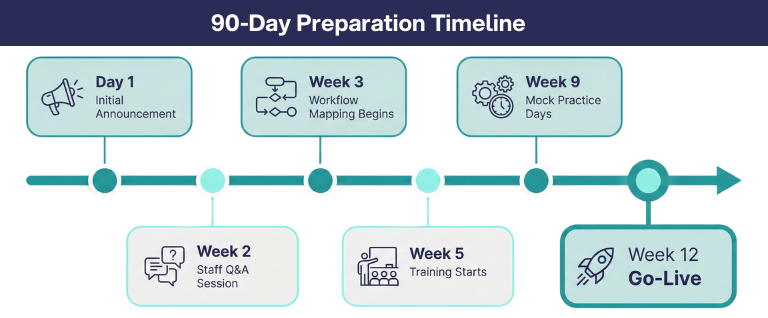
90-day Preparation Timeline for Go-live
Start the Conversation Early
Surprising your team with a software change announcement creates instant resistance. Three months provides the optimal preparation window for most practices.
The Initial Announcement
When you announce the change, share the specific pain points driving the decision. If your current system creates billing headaches, doubles data entry, or forces workarounds, tell your team. They experience these frustrations daily and will appreciate knowing their challenges are being addressed.
Frame the change around how it will make their jobs easier. Instead of "Our current system is outdated and inefficient," try "This new system will eliminate the duplicate data entry you've been dealing with and automate appointment reminders so you can focus on patients instead of phone calls."
Address Concerns Head-On
Schedule a Q&A session after your initial announcement. Give staff time to process the news, then create space for questions and concerns. Common worries include:
- "Will I have to stay late to learn this?"
- "What if I can't figure it out as quickly as everyone else?"
- "Will my current shortcuts and workarounds still work?"
- "How long before we're back to normal speed?"
Answer these questions honestly. Yes, there will be a learning curve. No, you don't expect anyone to master everything immediately. The more transparent you are about the challenges, the more trust you build.
Identify Your Champions and Skeptics
Every practice has staff members who embrace new technology and others who prefer familiar routines. Understanding these dynamics shapes your preparation strategy.
Rely on Your Technology Advocates
Your technology champions naturally experiment with new features, help colleagues troubleshoot, and spread enthusiasm. Identify them early and involve them in the selection and preparation process:
- Give them preview access. Let champions explore the new system before general training begins.
- Ask for their input. Have them review training plans and suggest which features will excite different team members.
- Make them peer mentors. Pair champions with colleagues who may need extra support during training.
Win Over Your Skeptics
Resistance often stems from fear of the unknown or previous negative experiences with technology changes. Address skepticism proactively:
- Schedule one-on-one conversations. Listen to specific concerns without dismissing them.
- Identify their pain points. Often skeptics have legitimate frustrations with current workflows. Show them how the new system addresses these specific problems.
- Start with easy wins. During training, introduce skeptical team members to features that will make their daily work noticeably easier.
- Acknowledge their expertise. Skeptics often have deep knowledge of current workflows. Position them as experts who can help identify what must be preserved in the transition.
Staff Readiness Assessment
How to Use This Assessment
Before beginning your EHR transition, create a similar table for each team member at your practice. Rate each person's technology comfort level as High (Champion), Medium, or Low (Skeptic). Document their specific concerns through one-on-one conversations. Then design individualized preparation strategies that address their unique needs and leverage their strengths.
This assessment helps you:
- Identify who can serve as peer mentors during training
- Allocate extra support time to team members who need it
- Address specific concerns before they become obstacles
- Create training pairs that balance technology comfort levels
- Customize the preparation approach for maximum effectiveness
Map Current Workflows Before Training Begins
Understanding how your team actually works (versus how you think they work) is critical for effective preparation.
Conduct Workflow Audits
Have each staff member document a typical day:
- Front desk staff. List every step from opening the practice through closing, including phone calls, scheduling, insurance verification, patient check-in, payment processing, and end-of-day reconciliation.
- Optical staff. Document frame selection, measurements, order entry, vendor communication, inventory management, and delivery coordination.
- Clinical staff. Track pre-testing procedures, equipment usage, doctor handoffs, and exam room preparation.
- Doctors. Note exam flow, documentation timing, prescription creation, and patient education approaches.
Identify Pain Points and Workarounds
Ask staff to highlight:
- Tasks that take longer than they should
- Steps that feel unnecessarily complicated
- Workarounds they've created to avoid system limitations
- Information they can't easily access when they need it
- Errors that happen frequently despite their best efforts
These pain points become your selling points. When you can show staff how the new system eliminates a specific frustration they face daily, you convert skeptics into advocates.
Compare Old Workflows to New Capabilities
Create side-by-side comparisons showing how tasks will change:
- Current process: "Call insurance company, wait on hold 15 minutes, verbally confirm coverage, manually enter details into system."
- New process: "Automated eligibility check runs when appointment is booked, coverage details populate automatically through ABB Verify integration."
These comparisons help staff visualize the transition and understand what they're working toward.
Role-based EHR Training Plan
One-size-fits-all training wastes everyone's time. Different roles need different depths of knowledge about different features.
Front Office Staff Preparation
Your front desk team needs deep expertise in patient-facing features:
- Scheduling mastery. Practice with complex scenarios: double-booking emergencies, managing provider preferences, handling recurring appointments, and coordinating multi-doctor practices.
- Insurance verification. Learn to interpret automated eligibility results, identify coverage gaps, and communicate financial expectations to patients.
- Payment processing. Explore all payment methods including stored cards, mobile payments, and online bill pay through integrated systems.
- Patient communication. Understand how to manage automated reminders, waitlist notifications, and appointment confirmations.
Preparation activities: Create 20 realistic patient scenarios covering new patients, established patients, insurance changes, and complex family accounts. Have staff practice each scenario multiple times until the workflow becomes automatic.
Role-Specific Training Focus Areas
How to Use This Training Guide
This table provides baseline time investments and practice requirements for each role in your practice. Adjust these estimates based on your team's technology comfort levels and the complexity of your workflows.
Training Tips by Role
- Front desk: Focus heavily on insurance verification and payment processing, as these directly impact revenue cycle and patient satisfaction.
- Optical: Emphasize SmartFlow integration to maximize time savings from direct supplier connections.
- Clinical staff: Prioritize equipment integration and Rapid Review access to streamline patient preparation.
- Doctors: Concentrate on voice documentation and template customization to reduce post-exam charting time.
Schedule training sessions in 2-3 hour blocks rather than full-day marathons. This allows staff to absorb information, practice skills, and return with questions.
Optical Staff Preparation
Your optical team manages the bridge between clinical care and product fulfillment:
- Product catalog navigation. Learn to quickly locate frames, lenses, and contacts across multiple vendors.
- Order processing efficiency. Master connections that link directly to suppliers like CooperVision and HOYA, eliminating manual order entry.
- Inventory management. Practice receiving shipments, updating stock levels, and transferring inventory between locations.
- Order tracking and communication. Understand how to monitor order status and keep patients informed about delivery timelines.
Preparation activities: Build a sample inventory with realistic product mix. Practice entering, tracking, and fulfilling orders. Simulate common problems like discontinued items, back-orders, and incorrect shipments.
Clinical Staff Preparation
Pre-test technicians and clinical assistants prepare patients for doctors:
- Efficient data entry. Practice entering visual acuity, autorefraction, tonometry, and preliminary findings quickly and accurately.
- Equipment integration. Understand how diagnostic devices automatically import data into patient records and what to do when automation fails.
- Patient history verification. Learn to quickly update medications, allergies, and health conditions before the doctor enters.
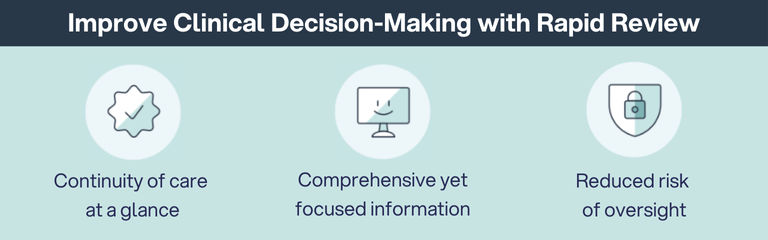
- Exam preparation tools. Explore Rapid Review to surface relevant information from previous visits without clicking through multiple screens.
Preparation activities: Create test scenarios representing typical patient presentations. Practice pre-testing workflows with time goals for each step. Role-play patient interactions where histories need updating or clarification.
Doctor Preparation
Optometrists need documentation tools that keep pace with clinical thinking:
- Customizable templates. Set up exam templates that match your documentation style and preferred workflow.
- Voice-driven documentation. Practice using AI Scribe to dictate findings for visual acuity, confrontation fields, pupils, and other common tests.
- Historical data access. Learn to pull up Rapid Review from six different workflow points to view current and historical encounter summaries.
- Prescription management. Understand electronic prescription transmission, patient portal access to prescriptions, and contact lens parameter validation.
Preparation activities: Document five complete exams using voice entry. Practice accessing patient history mid-exam without disrupting patient interaction. Set up and customize templates before go-live.
Create Realistic Practice Environments
Reading manuals and watching videos only creates theoretical knowledge. Confidence comes from successfully completing tasks repeatedly.
Build Your Test Patient Library
Create 30-40 fictional patient records that mirror your practice:
- Diverse demographics. Include pediatric patients, working adults, and seniors.
- Varied insurance. Represent your actual payer mix with Medicare, Medicaid, VSP, EyeMed, and private insurance.
- Complex histories. Include patients with diabetes, glaucoma, macular degeneration, and post-surgical follow-ups.
- Family accounts. Link related patients to practice managing household relationships.
Run Full-Day Simulations
Before go-live, schedule practice days where staff work through complete appointment schedules using test data:
- Morning huddle. Review the day's schedule and identify potential challenges.
- Patient check-in. Practice verifying demographics, updating insurance, and collecting copays.
- Clinical workflows. Complete pre-testing, exams, and documentation for multiple patient types.
- Optical fulfillment. Process frame orders, contact lens orders, and inventory transactions.
- End-of-day procedures. Practice closing routines, reconciliation, and preparation for the next day.
Practice Exception Handling
Don't limit training to perfect scenarios. Introduce realistic complications:
- Insurance verification failures. Practice what happens when automated checks don't return results.
- Scheduling conflicts. Handle double-bookings, last-minute cancellations, and emergency add-ons.
- Equipment problems. Simulate integration failures that require manual data entry.
- Payment issues. Practice handling declined cards, payment plans, and disputed charges.

Managing the Human Side of Change
Technology transitions trigger predictable emotional reactions. Anticipating these responses helps you prepare appropriate support.
Anxiety About Competence
Staff members worry they won't master the new system as quickly as colleagues. Address this by:
- Normalizing the learning curve. Share that everyone feels clumsy at first, even technology enthusiasts.
- Celebrating small wins. Recognize each successfully completed task, especially during early training.
- Providing private practice time. Let staff experiment without colleagues watching.
- Emphasizing progress over perfection. Focus on improvement rather than immediate mastery.
Frustration With Temporary Inefficiency
Tasks that previously took seconds now require conscious thought and multiple steps. Prepare staff by:
- Setting timeline expectations. Tell them the first week will feel slow, the second week will feel better, and by week four most tasks will feel automatic.
- Acknowledging the frustration. Validate that temporary incompetence feels uncomfortable, especially for experienced staff.
- Pointing toward the payoff. Remind them they're investing this time to eliminate far greater frustrations they currently experience.
Fear of Job Security
Some staff members worry that automation will make their roles obsolete. Address this directly:
- Clarify what's changing. Explain that automation eliminates tedious tasks, not positions.
- Highlight expanded capabilities. Show how freed-up time allows staff to take on more interesting responsibilities.
- Emphasize human judgment. Stress that technology handles routine tasks while staff handle exceptions, relationship-building, and problem-solving.
EHR Go-live Readiness Checklist
Your Team's Readiness Determines Your Success
The most sophisticated practice management system becomes worthless if your team isn't prepared to use it effectively. Technology transitions fail when practices focus on features and forget about people.
Successful implementations happen when you invest in team preparation as much as in the software itself. With three months of advance notice, honest conversations about challenges, role-specific training plans, and realistic practice scenarios, you transform initial resistance into genuine capability.
Be Ready with RevolutionEHR
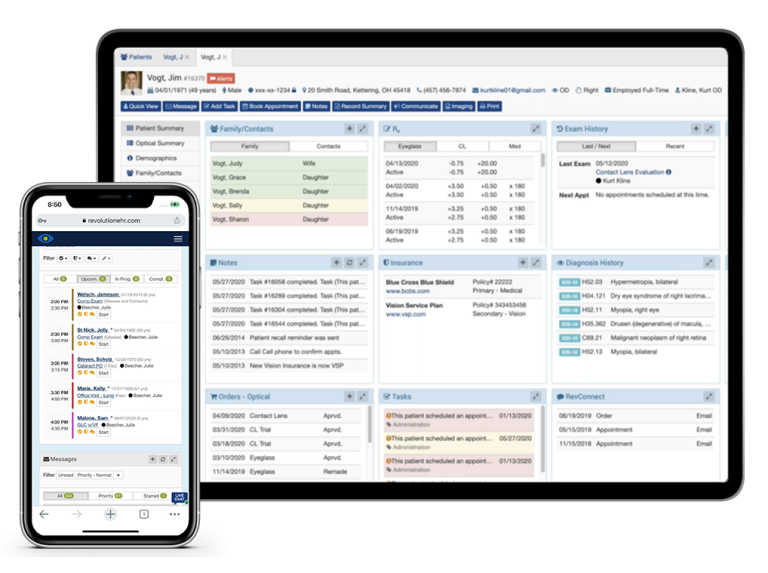
RevolutionEHR's dedicated implementation team with eye care backgrounds understands the unique preparation needs of optometry practices. With comprehensive onboarding support and training programs designed specifically for optometry workflows, your team gets the preparation they need to succeed.
Schedule a demo to see how RevolutionEHR's approach to team preparation sets your practice up for success from day one.



FAQs
What should we measure to know the transition is working?
What’s the best way to practice before launch?
What workflows should we test to protect revenue?
How can we reduce disruption during go-live week?
What should we train first, and what can wait until after go-live?

Backed by deep expertise in optometry and a commitment to the success of eye care practices, RevolutionEHR offers insights and perspectives designed to help providers streamline operations, enhance patient care, and thrive in a changing healthcare landscape.