

5 Signs It’s Time to Upgrade Your Optometry EHR

- Remove the current class from the content27_link item as Webflows native current state will automatically be applied.
- To add interactions which automatically expand and collapse sections in the table of contents select the content27_h-trigger element, add an element trigger and select Mouse click (tap)
- For the 1st click select the custom animation Content 27 table of contents [Expand] and for the 2nd click select the custom animation Content 27 table of contents [Collapse].
- In the Trigger Settings, deselect all checkboxes other than Desktop and above. This disables the interaction on tablet and below to prevent bugs when scrolling.
Your optometry EHR should reduce phone calls, simplify workflows, and help patients manage care through a modern patient portal. If your team is stuck doing manual work that should be handled by automation, or you can’t pull clear reporting and analytics on no-shows, revenue, and retention, the system isn’t supporting your practice—it’s slowing it down.
Here are five signs it’s time to upgrade, and what a modern optometry EHR like RevolutionEHR can do differently.
Sign 1: Patients Can't Manage Their Care Online

Why Limited Patient Access Hurts Your Practice
Today's patients expect to handle healthcare tasks the same way they manage everything else: online, on their schedule. If your current system doesn't offer a robust patient portal, you're creating friction at every touchpoint.
What you're dealing with:
- Constant phone calls for basic requests. Scheduling, prescription refills, and payment questions flood your front desk.
- Paper forms and manual data entry. Patients arrive early to fill out clipboards, then staff re-enters everything into your system.
- No self-service options. Patients can't check appointment times, view balances, or access their records without calling your office.
- Lost patients to competitors. Practices with modern portals simply offer more convenience.
What a Modern Patient Portal Should Include
RevolutionEHR's Patient Portal gives patients one secure hub to manage every aspect of their care. The portal is mobile-responsive, HIPAA-compliant, and customizable to match your practice branding.
The bottom line: A modern patient portal reduces inbound calls, speeds up check-in, and keeps patients engaged between visits. If your current EHR doesn't offer these capabilities, you're making both patients and staff work harder than necessary.
Sign 2: Contact Lens Ordering Is Manual and Error-prone
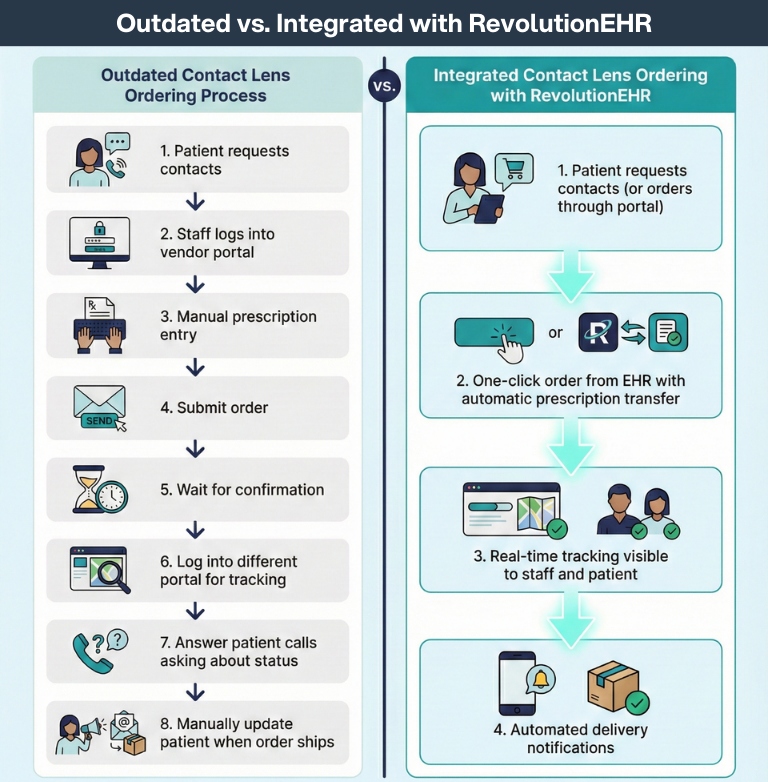
Contact lens ordering should be straightforward. Instead, many practices juggle multiple vendor portals, phone calls, faxes, and manual tracking systems just to get patients their lenses.
Common pain points:
- Multiple logins and systems. Staff logs into separate vendor portals throughout the day.
- Manual data entry errors. Prescription details get transposed or entered incorrectly.
- No order status visibility. Patients call repeatedly asking when their contacts will arrive.
- Inventory management headaches. No clear picture of what's in stock or on order.
- Delayed deliveries. Orders get lost in the shuffle between systems.
What Integrated Ordering Should Look Like
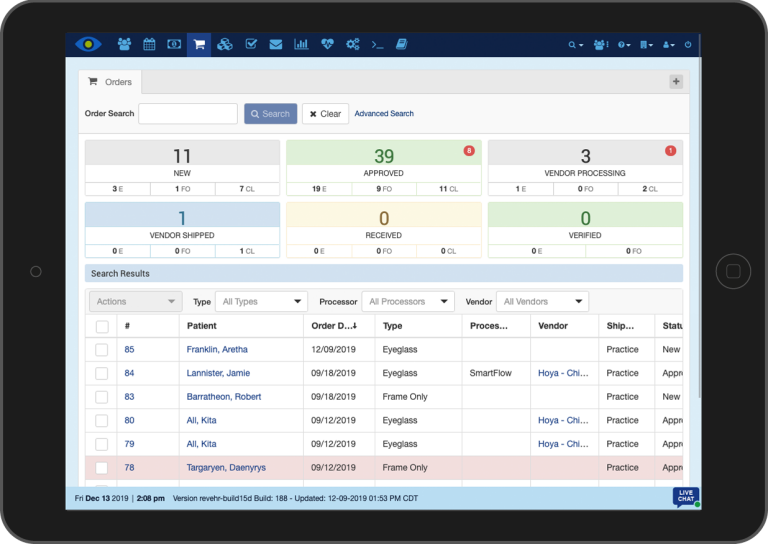
Modern practice management systems connect directly with suppliers to streamline the entire process from prescription to delivery. RevolutionEHR's SmartFLOW for Sight eliminates the back-and-forth by linking your practice directly with vision product suppliers.
What integrated ordering delivers:
- Single-click ordering. Place orders for contacts, glasses, and supplies without leaving your EHR.
- Automatic prescription transfer. Patient data flows directly from the encounter to the order.
- Real-time order tracking. See order status at a glance and proactively communicate with patients.
- Direct supplier connections. Partners include CooperVision, Hoya, and other major suppliers.
- Reduced errors. Eliminate manual entry and transcription mistakes.
- Faster fulfillment. Orders process immediately with electronic transmission.
Patient portal integration: Patients can place contact lens orders themselves through the portal, checking their prescription and order history without involving your staff.
The bottom line: If ordering contacts requires your team to log into three different systems and manually enter the same information repeatedly, your EHR is costing you time and money.
Sign 3: Staff Spends More Time on Admin Than Patients

Where Time Gets Lost in Outdated Workflows
Every minute your staff spends on redundant data entry, manual insurance verification, or chasing down paper forms is a minute they're not spending on patient care. Outdated EHR systems force workflows that made sense 15 years ago but create bottlenecks today.
Signs your workflows need an upgrade:
- Manual appointment reminders. Staff makes reminder calls or sends individual texts one by one.
- Duplicate data entry. Information gets entered multiple times across different parts of the system.
- Paper-based processes. Intake forms, consent documents, and patient communications still rely on printing and scanning.
- Manual insurance checks. Verifying coverage requires phone calls or separate portal logins before every appointment.
- Post-visit delays. Patients wait while staff manually processes payments and prints receipts.
Automations That Actually Matter (examples)
Modern EHR systems automate repetitive tasks so your team can focus on higher-value work that directly impacts patient care and satisfaction.
In one case study, a two-location practice recovered 40+ hours of in-house billing work per week by switching to RevBilling.
Automated workflows in action:
- Appointment reminders and recalls. Automatically send text and email reminders on your schedule.
- Online registration and intake. Patients complete forms digitally before arriving, with data flowing directly into the EHR.
- Automated insurance verification. RevolutionEHR's Insurance Eligibility feature checks coverage automatically when appointments are booked.
- Integrated payment processing. RevPayments handles transactions seamlessly with multiple payment options including Apple Pay and stored cards.
- Digital communications. RevEngage automates patient outreach for recalls, order updates, and practice marketing.
The bottom line: If your staff routinely stays late to catch up on administrative work or you're considering hiring additional front desk help, your EHR's inefficiencies are eating into your profitability.
Sign 4: Missing Usable Reporting and Insights
Questions You Should Be Able to Answer Weekly
Running a successful optometry practice requires clear visibility into what's working and what's not. Many older EHR systems either lack reporting capabilities entirely or make it so difficult to generate reports that practices simply stop trying.
What you can't see is costing you:
- No-show and cancellation patterns. Which appointment slots consistently go unfilled?
- Revenue trends. How do sales vary by provider, service type, or season?
- Patient retention rates. Who's coming back regularly and who's falling through the cracks?
- Inventory performance. What products move quickly and which ones sit on shelves?
- Insurance reimbursement timing. Where are claims getting stuck?
- Staff productivity. How efficiently are different team members handling patient volume?
What Built-in Analytics Should Include
RevolutionEHR provides comprehensive reporting across every aspect of practice operations. Reports are easy to generate, customizable to your needs, and provide real-time data for informed decision-making.
CMS compliance made easy: RevAspire, RevolutionEHR's compliance solution, provides quarterly MIPS score estimates, peer comparisons, and end-of-year data analysis to maximize reimbursements.
The bottom line: If you can't quickly answer basic questions about your practice's performance, you're making decisions in the dark. Modern reporting tools transform raw data into actionable insights.
Sign 5: Your EHR Can't Keep Up With Modern Optometry
Optometry has changed dramatically over the past decade: advanced diagnostic equipment, specialty contact lenses, medical billing requirements, telemedicine options. Your EHR should evolve with your practice, not hold it back.
Signs your EHR is outdated:
- Limited or no equipment integration. Diagnostic data requires manual entry instead of automatic import.
- Clunky mobile access. The system doesn't work properly on tablets or smartphones.
- No telehealth capabilities. Adding virtual consultations means purchasing and learning separate software.
- Outdated security protocols. The system lacks modern encryption and HIPAA-compliant communication tools.
- Poor specialty lens support. Custom and specialty contact lens fitting is cumbersome or unsupported.
- Server-based limitations. You're stuck with on-site servers, manual backups, and restricted remote access.
Optometry EHR Upgrade Checklist
What Modern Optometry Practices Need from Their EHR


What a Cloud-Based Modern EHR Delivers
RevolutionEHR was built specifically for today's optometry practices, with cloud-based architecture that supports modern workflows and integrates with the tools you actually use.
Built for how you work today:
- Extensive equipment integration. Integrates with a broad range of ophthalmic devices (see supported device list).
- True cloud access. Work securely from any device—computer, tablet, or smartphone—anywhere with internet.
- HIPAA-compliant communications. RevDirect enables secure messaging with other healthcare providers directly within the EHR.
- Comprehensive security. SHA-256 encryption, automatic backups, and two-factor authentication protect patient data.
- Specialty lens documentation. Customizable templates and workflows support complex fittings and specialty products.
- Regular updates. Cloud-based delivery means automatic feature updates and security patches.
- Seamless partner integrations. RevolutionEHR connects with VisionWeb, FRAMESData, EyeDock, VSP, and other industry partners to eliminate redundant systems and manual processes.
The bottom line: If your current EHR forces you to work around its limitations rather than supporting how modern optometry actually functions, it's time to upgrade.
Is Your EHR a Growth Engine or an Operational Anchor?
These five signs point to a common problem: your EHR is holding your practice back instead of moving it forward. When patients can't manage their care online, ordering contacts requires multiple systems, your staff drowns in administrative work, you lack visibility into practice performance, and your technology can't support modern optometry workflows, every day costs you time, money, and patient satisfaction.
Modern EHR systems like RevolutionEHR eliminate these friction points with:
- Integrated patient portals
- Seamless contact lens ordering
- Automated workflows that free up staff time
- Comprehensive reporting and analytics
- Cloud-based architecture built for today's optometry practice
The question isn't whether to upgrade; it’s how much longer you can afford to wait.
Ready to see how RevolutionEHR solves these challenges? Schedule a demo to explore how modern EHR features can transform your practice efficiency and patient experience.
FAQs
How long does an optometry EHR conversion take?
Will a new EHR reduce no-shows and phone calls?
What are the biggest signs an optometry EHR is outdated?
How can an EHR help with contact lens ordering and tracking?
Does a cloud-based optometry EHR matter?

Backed by deep expertise in optometry and a commitment to the success of eye care practices, RevolutionEHR offers insights and perspectives designed to help providers streamline operations, enhance patient care, and thrive in a changing healthcare landscape.